
Ever wished to see yourself in a fun cartoon or see your pet dressed in suits? Or maybe you want to create a fun Christmas greeting with magical effects. Right now, AI video effects make these ideas possible for everyone!
This guide will show you a simple way to make an AI video directly in your browser. You just need to pick a template. Then upload a photo and let the AI work. It’s perfect for beginners with no editing experience. The platform also offers many templates and editing tools to boost your creativity. Let’s explore how you can start creating!
What are AI Video Effects
AI video effects use advanced AI models like Gemini Nanobanana to transform your videos easily. They add fun and creative elements that would be hard to create by hand. Its main benefit is making your videos more engaging and unique without any editing skills.
These video filters offer a wide range of ready-to-use template styles. You can find interactive effects like kissing or hugging, looks that change your appearance, and dance moves. There are also moods, holiday themes for Halloween or Christmas, and special sections for pets.
You simply pick the template you like. Then, with one click, your personalized AI video is ready. This makes sharing fun moments online both quick and effortless.
Best AI Video Effects: Media.io AI Effects
AI video effects help you add fun and professional touches to your clips. They make your videos more engaging without complicated editing. For the best experience, we recommend Wondershare Media.io. This platform truly understands advanced AI models. It is an all-in-one hub for video and audio creation. A key strength is its direct integration with powerful AI models like Nano Banana. This allows the tool to generate highly realistic and smooth effects effortlessly.
Media.io AI Effects offers over 5000 special effect templates. You can create a video with just one click. The effects library is vast as well. It includes interactive scenes for two people, such as sharing a kiss or a hug. You will also find themed greetings for major holidays. There are playful filters to turn yourself or your pet into an anime character. Many other unique visual styles are available, too.
Beyond video effects, Media.io provides AI image effects. It also has a full suite of audio and video editing tools. This means you can handle your entire project on one site. It saves time and keeps your workflow simple.
Additionally, Media.io has an “Explore” section to help you with inspiration. This community space is filled with user-submitted templates. You can browse countless examples and even use them for your own projects. Trending collections are also available. This helps you quickly find popular and up-to-date styles. With Media.io, creating stunning videos can be pretty easy!
- Leverages Leading AI Models: Media.io AI video effects are powered by advanced technologies like the Nano Banana model. This strong foundation allows it to produce remarkably realistic and artistic video effects. You can achieve professional-looking animations and transformations with ease.
- Offers a Vast Template Library: You can access over 5000 ready-to-use templates. This library covers a wide spectrum of styles, from fun interactions between people to festive holiday greetings. You can also find unique filters for pets, animated filters, and various special visual effects. Simply choose your favorite, and your personalized AI video is generated instantly.
- Provides All-in-One Editing Studio: Apart from creation, the platform supports full post-production work. It offers a comprehensive suite of video and audio editing tools. You can enhance video quality, refine audio with AI tools, add music, and make precise adjustments.
- Features an Inspiring Community Hub: You can explore a dynamic section filled with user-submitted creations. This space allows you to browse trending templates and popular styles. You can even click on community posts to generate similar content for yourself.
- Free Daily Rewards: For a registered user, you can collect free credits each day. This gives you ongoing access to make AI videos without any cost.
How to Make an AI Video with Media.io AI Effects
Ready to try it yourself? Follow this simple guide to make an AI video using Media.io’s AI video effects.
Step 1. Browse and Select an AI Video Effect
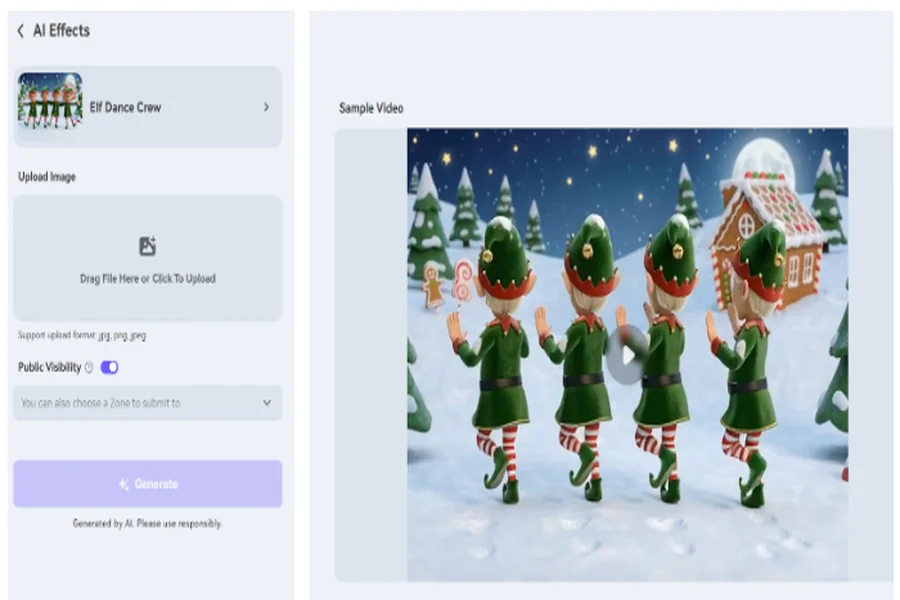
Launch Media.io AI Effect. There are many sections available, including “Interactions”, “Pets”, “Dance”, “Holiday”, and more. Pick a desired AI video effect.
Step 2. Upload Image and Adjust Settings
In the “Upload” area, “Click to Upload” your image. If available, you can customize advanced settings, such as “aspect ratio”. Once ready, click “Generate” to make an AI video.
Step 3. View and Export AI Video
When the process is complete, you can preview the result immediately. Simply click the “Download” button to save your AI video.
If you wish to try a different version, click the three-dot button to regenerate another version. You can also hover over the result and choose editing tools to enhance your video.
Conclusion
Making an AI video can never be easier today. AI video effects offer a powerful and simple solution to bring your vision to reality. For a top experience, we recommend Media.io AI Effects. It is powered by leading AI models, which ensure high-quality results. You can also gain access to a vast library with over 5000 creative templates. This helps you to generate unique videos instantly with just one click.
Additionally, the platform provides a wide range of editing tools for video, images, and audio. You can manage your project without switching between different apps. Using Media.io can definitely save you significant time and effort. If you want to see how easily you can bring your ideas to life, try Media.io AI Effects now to create your first AI video.